This tutorial takes one WACCM column through the full pipeline: from model profiles, to the aerosol the simulator sees, to simulated ALI measurements, to the L2 retrieval, which is then compared with the model’s own aerosol.
It uses the example column bundled with cesm-hawc, so it needs no CESM
output or orbit files, only the [sim] tier, installed as described in
Installation.
The first run builds and caches several Mie scattering databases, which takes a few minutes. The L2 retrieval then takes a few more.
from importlib.resources import files

import matplotlib.pyplot as plt
import numpy as np
import pandas as pd
import xarray as xr

import cesm_hawc
from cesm_hawc.constituents import build_waccm_constituents
from cesm_hawc.noise import default_noise_model
from cesm_hawc.orbit_files import l1b_image_to_dataset
from cesm_hawc.simulation import DEFAULT_PRODUCTS, run_ali_simulation_from_profiles

cesm_hawc.configure_environment()
1. Load the example column
The example file holds one WACCM column, already interpolated onto a 0–65 km
grid every 1 km: temperature, pressure, trace gases, and the number and
median radius of the MAM4 accumulation (a1) and coarse (a3) sulfate
modes. It has the same layout as the files cesm-hawc save-inputs writes.
To use your own model output instead, set WACCM_FILE in the next cell to a
CAM history file. The column nearest LAT, LON is extracted, saved to
example_column.nc in the current directory with the name of the source file
recorded, and used for the rest of the tutorial. Leave WACCM_FILE as None
to use the bundled example.
# A CAM history file to extract the column from, or None for the bundled example.
WACCM_FILE = None   # e.g. "/path/to/case.cam.h0.2035-02.nc"
LAT, LON = 30.6, 180.0
TIME_INDEX = 0

if WACCM_FILE is None:
    column_path = files("cesm_hawc") / "data" / "example_column.nc"
else:
    from pathlib import Path

    from cesm_hawc.waccm import WACCMAtmosphere

    column_path = Path("example_column.nc")
    WACCMAtmosphere(WACCM_FILE).save_column_profiles(
        LAT, LON, str(column_path), time_index=TIME_INDEX
    )

    # Record which history file the column came from.
    column = xr.load_dataset(column_path)
    column.attrs["source_file"] = Path(WACCM_FILE).name
    column.to_netcdf(column_path)
Saved example_column.nc (27 KB)
ds = xr.open_dataset(column_path)

# The same dictionary WACCMAtmosphere.get_column_profiles() returns.
profiles = {"altitudes_m": ds["altitude_m"].values}
profiles.update({name: da.values for name, da in ds.data_vars.items()})
profiles["sulfate_a1_sigma"] = float(ds.attrs["sigma_a1"])
profiles["sulfate_a3_sigma"] = float(ds.attrs["sigma_a3"])

alt_m = profiles["altitudes_m"]
lat, lon = float(ds.attrs["latitude"]), float(ds.attrs["longitude"])
ds2. Look at the sulfate aerosol
Each mode is described by its number concentration and lognormal median radius at every altitude.
alt_km = alt_m / 1e3
fig, (ax_n, ax_r) = plt.subplots(1, 2, figsize=(9, 5), sharey=True)
for mode, label in [("a1", "accumulation"), ("a3", "coarse")]:
    ax_n.semilogx(profiles[f"sulfate_{mode}_N_cm3"], alt_km, label=label)
    ax_r.plot(profiles[f"sulfate_{mode}_r_um"] * 1e3, alt_km, label=label)
ax_n.set(xlabel="Number concentration [cm⁻³]", ylabel="Altitude [km]", ylim=(10, 40))
ax_r.set(xlabel="Median radius [nm]")
ax_n.legend()
fig.tight_layout()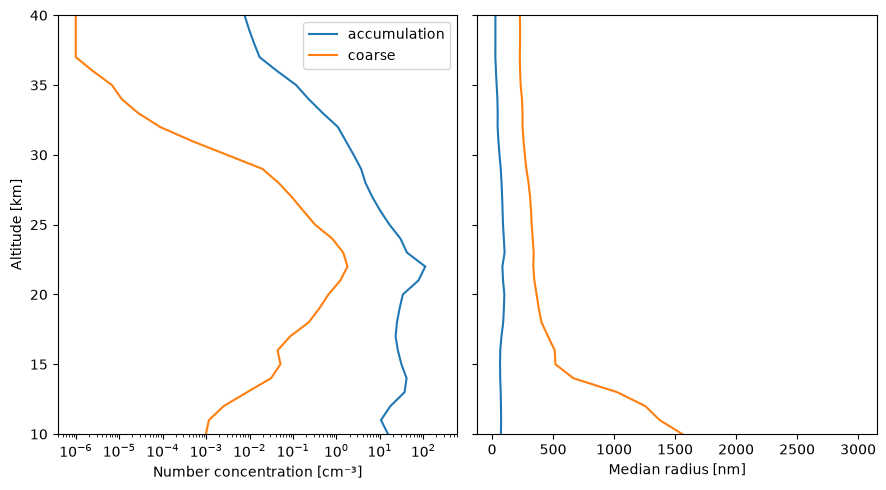
3. Build the simulator’s atmosphere
build_waccm_constituents converts the profiles into sasktran2
constituents: WACCM ozone and NO₂, and one aerosol constituent per sulfate
mode, each with a Mie database matched to that mode’s width. With
return_extinction=True it also returns the resulting extinction, the
“truth” the retrieval will be compared against.
wavelengths_nm = np.array([470.0, 745.0, 1020.0])

constituents, true_ext = build_waccm_constituents(
    profiles, alt_m, return_extinction=True, truth_wavelengths_nm=wavelengths_nm
)
sorted(constituents)
['aerosol_accum', 'aerosol_coarse', 'no2', 'o3']i745 = int(np.argmin(np.abs(wavelengths_nm - 745.0)))
truth_745 = (true_ext["aerosol_accum_extinction_per_m"][i745]
+ true_ext["aerosol_coarse_extinction_per_m"][i745])
fig, ax = plt.subplots(figsize=(5, 5))
ax.plot(true_ext["aerosol_accum_extinction_per_m"][i745], alt_km, label="accumulation")
ax.plot(true_ext["aerosol_coarse_extinction_per_m"][i745], alt_km, label="coarse")
ax.plot(truth_745, alt_km, "k", label="total")
ax.set(xlabel="Extinction at 745 nm [m⁻¹]", ylabel="Altitude [km]", ylim=(10, 40))
ax.legend()
fig.tight_layout()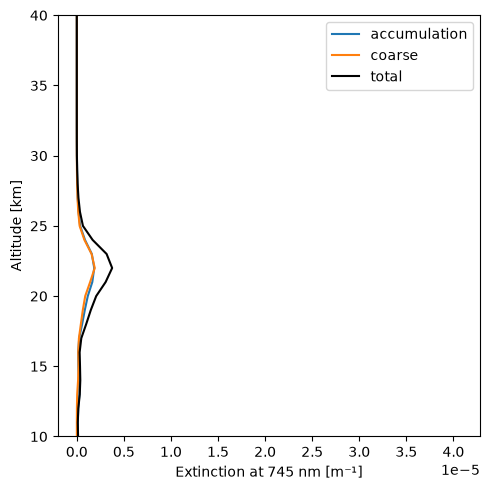
4. Simulate the ALI observation and retrieval
The simulator needs the viewing geometry: here a fixed tangent point (the column’s location) and fixed solar angles. The noise model is seeded so this notebook gives the same result every time it is run.
The retrieval prints its progress; we capture it to check that it converged.
import contextlib
import io

from cesm_hawc.convergence import parse_scipy_convergence

sim_geometry = {
    "tangent_latitude": lat,
    "tangent_longitude": lon,
    "tangent_solar_zenith_angle": 60.0,
    "tangent_solar_azimuth_angle": 0.0,
    "altitude_grid": alt_m,
    "polarization_states": ["I", "dolp"],
    "sample_wavelengths": wavelengths_nm,
    "time": pd.Timestamp("2035-02-01T12:00:00Z"),
}

log = io.StringIO()
with contextlib.redirect_stdout(log):
    data = run_ali_simulation_from_profiles(
        profiles, alt_m, sim_geometry,
        products=DEFAULT_PRODUCTS,
        noise_model=default_noise_model(seed=0),
    )
parse_scipy_convergence(log.getvalue())
{'converged': True, 'termination_reason': 'ftol', 'n_function_evaluations': 45}5. The simulated measurements (L1b)
ALI measures limb radiance and its degree of linear polarization (DoLP) at
each tangent altitude. l1b_image_to_dataset collects them, with their
noise, into one dataset.
l1b = l1b_image_to_dataset(data["l1b"], wavelengths_nm)

fig, (ax_i, ax_p) = plt.subplots(1, 2, figsize=(9, 5), sharey=True)
for wl in l1b["wavelength"].values:
    sel = l1b.sel(wavelength=wl)
    ax_i.semilogx(sel["radiance"], sel["altitude_m"] / 1e3, label=f"{wl:.0f} nm")
    ax_p.plot(sel["dolp"], sel["altitude_m"] / 1e3)
ax_i.set(xlabel="Radiance", ylabel="Tangent altitude [km]")
ax_p.set(xlabel="DoLP")
ax_i.legend()
fig.tight_layout()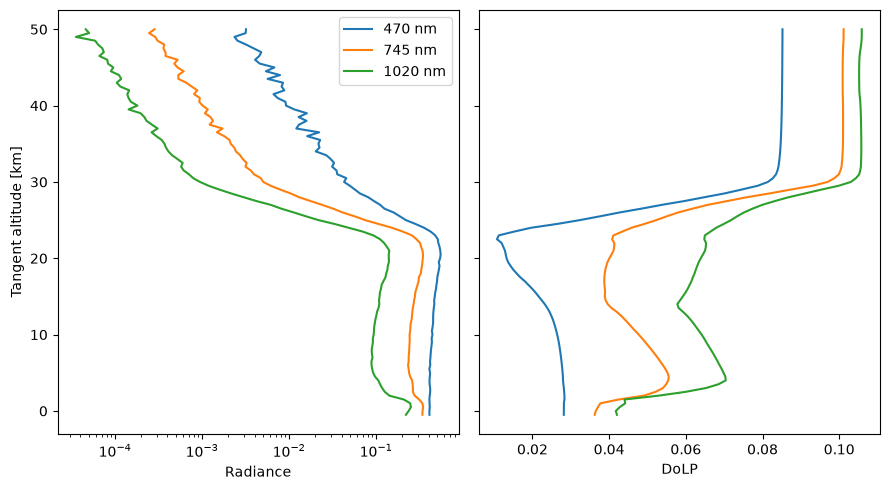
6. Compare the retrieval with the model truth
The L2 retrieval estimates aerosol extinction at 745 nm and a single median radius at each altitude. Unlike the model, which has two sulfate modes, the retrieval assumes one lognormal mode with a width of 1.6.
l2 = data["l2"]
ret_ext = l2["stratospheric_aerosol_extinction_per_m"]
ret_r = l2["stratospheric_aerosol_median_radius"]

fig, (ax_e, ax_r) = plt.subplots(1, 2, figsize=(9, 5), sharey=True)
ax_e.plot(truth_745, alt_km, "k", label="model truth")
ax_e.plot(ret_ext.values, ret_ext["altitude"].values / 1e3, "o-", label="retrieved")
ax_e.set(xlabel="Extinction at 745 nm [m⁻¹]", ylabel="Altitude [km]", ylim=(10, 40))
ax_e.legend()

for mode, label in [("aerosol_accum", "accumulation (truth)"), ("aerosol_coarse", "coarse (truth)")]:
    ax_r.plot(true_ext[f"{mode}_median_radius_nm"], alt_km, label=label)
ax_r.plot(ret_r.values, ret_r["altitude"].values / 1e3, "o-", label="retrieved")
ax_r.set(xlabel="Median radius [nm]")
ax_r.legend()
fig.tight_layout()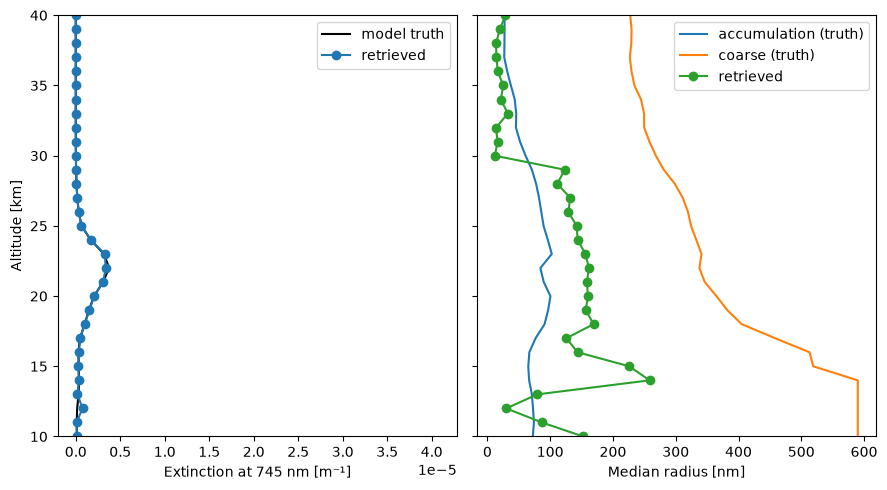
Next steps
Run the same steps on your own model output from the command line with
cesm-hawc run --mode fixed; see the Quickstart.Sample along a real HAWC orbit with
--mode orbit; see Run modes.